

PID Lítačka App Guide
Prague public transport is reliable, affordable, and easy to use — once you understand how it works. From navigating the Prague tram system to choosing the right ticket type, the learning curve can feel steep at first. If you’re new to Prague public transport, the simplest way to handle tickets, in my experience, is through the app, PID Lítačka.
During my time living in Prague, I used the PID Lítačka app daily to store my annual transport pass. I relied on Google Maps for route planning, but having my pass stored digitally gave me peace of mind — especially with Prague’s strict ticket inspections. After helping my parents and several friends set it up, I saw how quickly it removed the intimidation factor from using Prague public transport.
Whether you’re visiting for a weekend or moving to Prague long-term, this guide will walk you through exactly how to use the PID Lítačka app to buy tickets, purchase passes, and confidently use Prague public transport from day one.
In this guide, you’ll learn:
- How to download and set up the PID Lítačka app
- Step-by-step instructions for buying short-term tickets (perfect for visitors)
- How to purchase long-term passes (ideal for students and residents)
- Common mistakes to avoid (including the #1 mistake that leads to fines)
- Answers to the most frequently asked questions
Let’s dive in and make Prague’s public transport simple.
Prague Public Transport Basics
Prague public transport is part of the city’s integrated system known as PID (Prague Integrated Transport), which connects trams, metro lines, buses, and even regional trains under one ticketing structure. The network operates across clearly defined zones, with most visitors only needing coverage for central Prague. Trams and buses in Prague run frequently — often every few minutes — and the metro operates on three main lines (A, B, and C), making it easy to reach almost any neighborhood without a car. The system carries over a billion passengers annually and is widely considered one of the most efficient ways to get around the city.
Unlike many cities, tickets are time-based rather than distance-based. This means you can hop on and off as many trams, metros, and buses as you want within your ticket window – perfect for sightseeing. Now that you understand how the system works, let’s talk about one of the easiest ways to access it.
The PID Lítačka App
Start by downloading PID Lítačka on either the App Store or Google Play (again PID stands for Prague Integrated Transport, and Lítačka translates roughly to “ticket” or “travel card”).
This app is your one-stop shop for Prague public transport. Here’s what it can do:
- Purchase single-ride tickets and longer-term passes
- Look up routes and departure times
- Check parking availability
- View a map of Prague’s transport network
- Manage your profile and active passes under “More”
What I actually used it for: Buying tickets and passes. That’s the core function we will be going over in this guide.
One heads-up: Some features are still in Czech – particularly certain steps when purchasing passes. Don’t let this intimidate you. I’ll walk you through the ticket and pass purchase process step-by-step with screenshots so you know exactly what to click, even when the language switches.
Step-by-Step: How to Purchase Short-Term Tickets
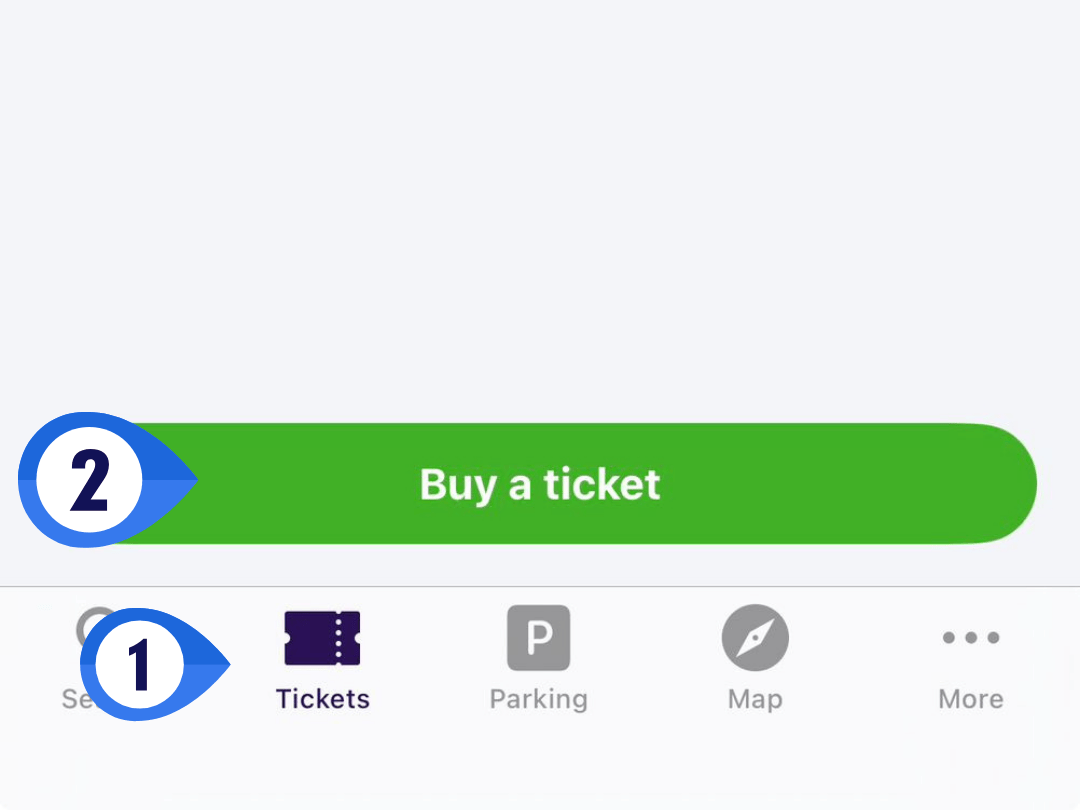
Step 1: Click on ‘Tickets’ Tap the ‘Tickets’ button in the bottom menu bar of the app.
Step 2: Click ‘Buy a Ticket’ Tap the green ‘Buy a Ticket’ button.
Step 3: Select Your Ticket Type You’ll see the ‘Ticket Selection’ screen with several options. Here’s the pricing for adult tickets:
- 30 minutes – 36 CZK (~$1.75)
- 90 minutes – 46 CZK (~$2.25)
- 24 hours – 140 CZK (~$6.85)
- 72 hours – 340 CZK (~$16.65)
Note: You’ll also see a ‘Suburban’ tab that offers shorter ticket times (like 15 minutes) for specific zones. Unless you have a very specific itinerary mapped out by zones and time periods, I recommend sticking with the ‘Prague’ tab – it’s simpler and covers most travel needs.
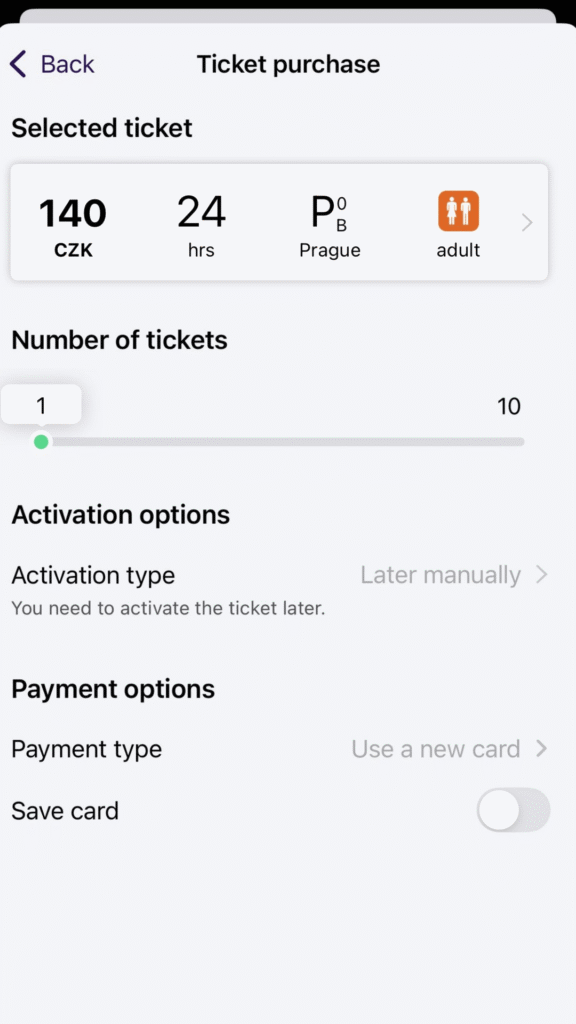
Step 4: Complete Your Purchase After selecting your ticket type, you’ll land on the ticket purchase page. Here’s what to set:
- Number of tickets – If you’re traveling with others, you can buy multiple tickets at once
- Activation type – This is important:
- Activate immediately: Choose this if you’re buying right before you board
- Activate later manually: Choose this if you’re buying ahead (like the night before). You’ll activate it manually right before you get on the tram
- Payment Options– Select your payment type. Heads up: Some cards aren’t accepted – notably American Express
VERY IMPORTANT: Always activate your digital ticket before boarding public transport. Riding without an activated ticket = fines from inspectors.
Step-by-Step: How to Purchase Long-Term Passes
Passes are ideal if you’re staying in Prague for an extended period – whether you’re studying abroad, working, or living here temporarily. Unlike short-term tickets, passes are valid for longer periods: one month, three months, or one year.
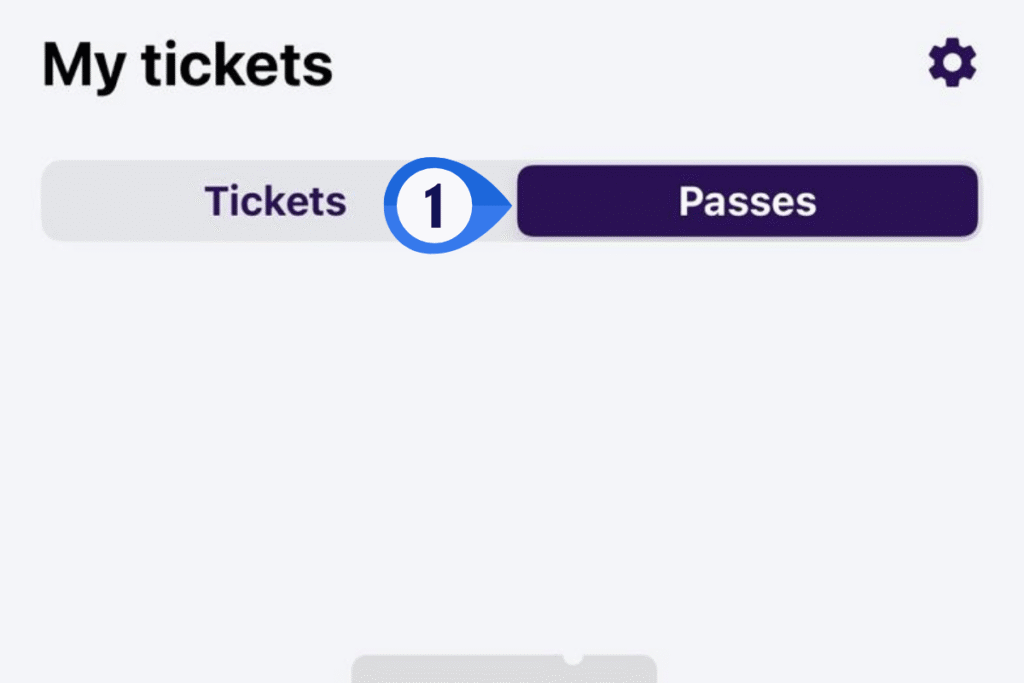
Step 1: Navigate to Passes Tap the ‘Tickets’ button in the bottom menu bar, then toggle from ‘Tickets’ to ‘Passes’ at the top of the screen.
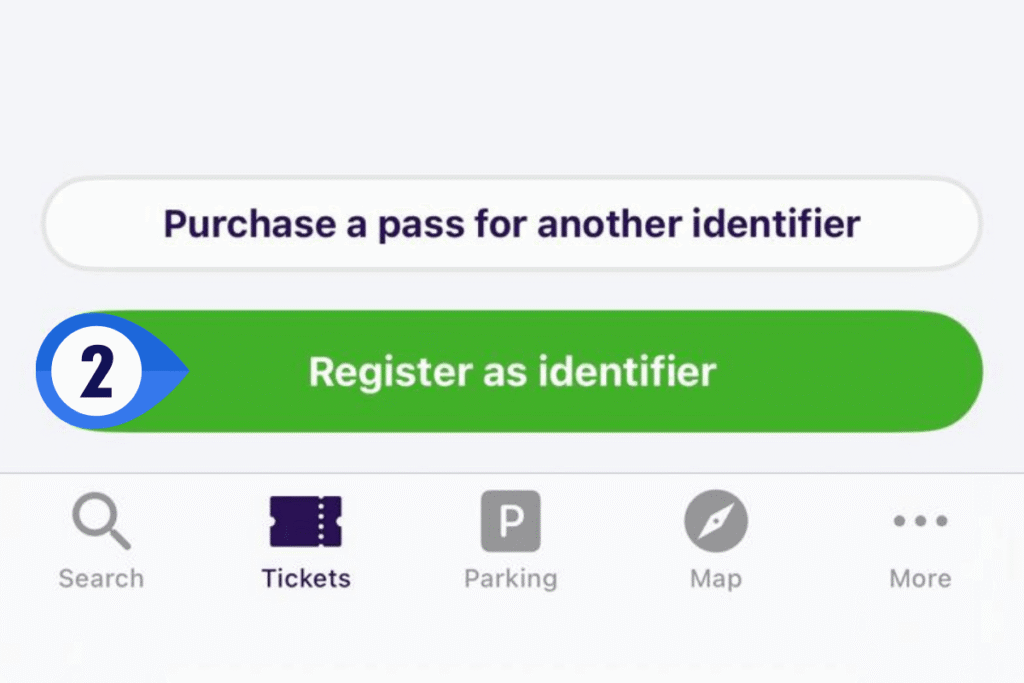
Step 2: Set Up Your Identifier Before you can purchase a long-term pass, you need to set up an identifier. This essentially ties your pass to your device and prevents unauthorized use.
To set up an identifier:
- Fully register your account in the app
- Add a photo (passport-style photo recommended – clear face shot, neutral background)
- Complete your profile
Don’t worry if you change phones – you can transfer your identifier to a new device.
Step 3: Select Your Pass Type Once your identifier is set up, click ‘Buy a Pass’ and confirm the identifier (this verifies the device you’re using). You’ll then see the pass selection screen.
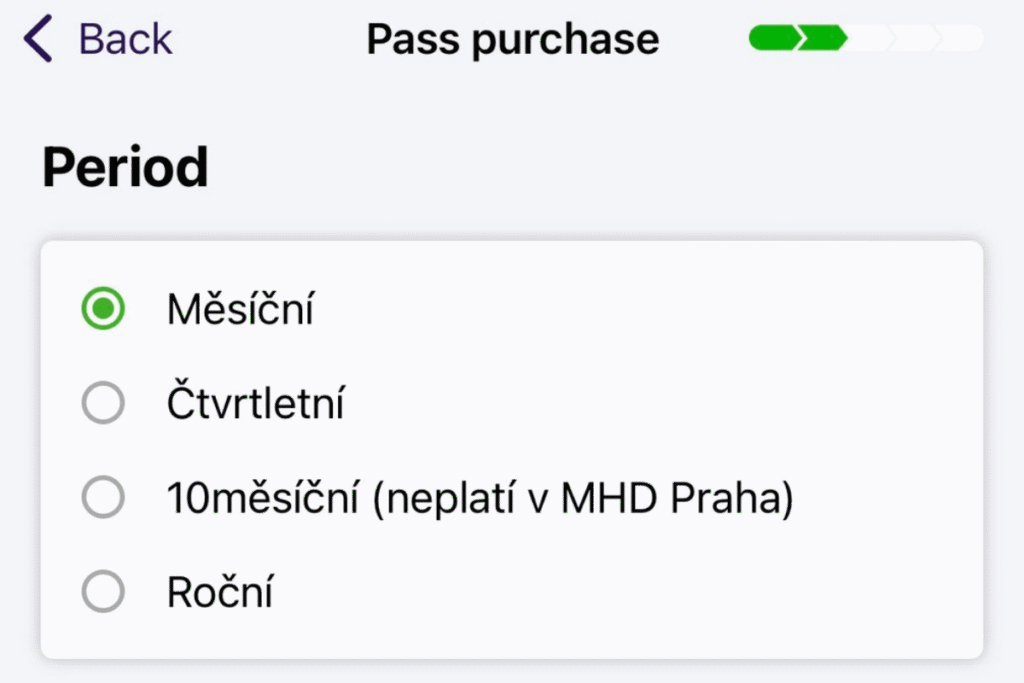
This screen includes some Czech text, but don’t let it intimidate you! Here are the translations and pricing:
- Měsíční (Monthly) – 550 CZK (~$27)
- Čtvrtletní (Quarterly/3 months) – 1,480 CZK (~$72)
- 10měsíční (10-month) – Note: This option appears in the app but wouldn’t let me check pricing. It’s likely a special student pass. For most travelers and expats, the monthly, quarterly, or annual passes are your best bet.
- Roční (Annual) – 3,650 CZK (~$179)
Step 4: Choose Your Validity Start Date After selecting your pass type, you can choose when the validity begins. This is super helpful if you’re planning ahead – for example, if you’re traveling to Prague in three months and want to purchase your pass now, you can set the start date for your arrival.
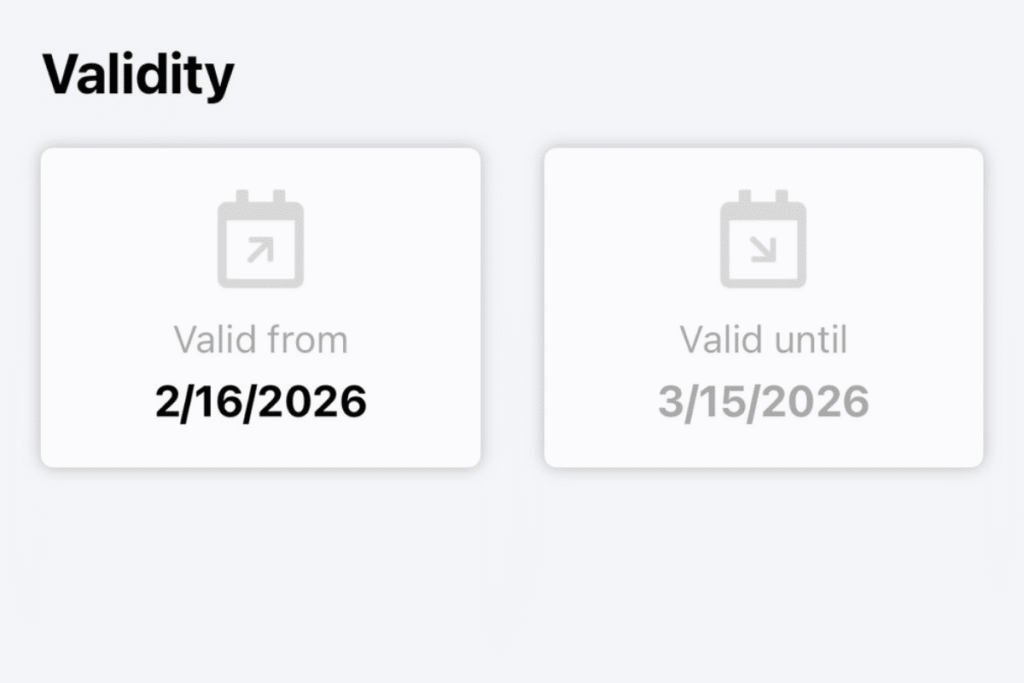
Step 5: Select Tariff Category Next, the app will prompt you to choose a tariff category. You’ll see “Občanské” – this means “Citizen/Civilian” and is the standard adult fare category. There’s only one option, so just select it and hit ‘Continue.’
Step 6: Select Your Zones On the next screen, you’ll choose which zones your pass covers. This is separated into “Prague” and numbered zones/regions.
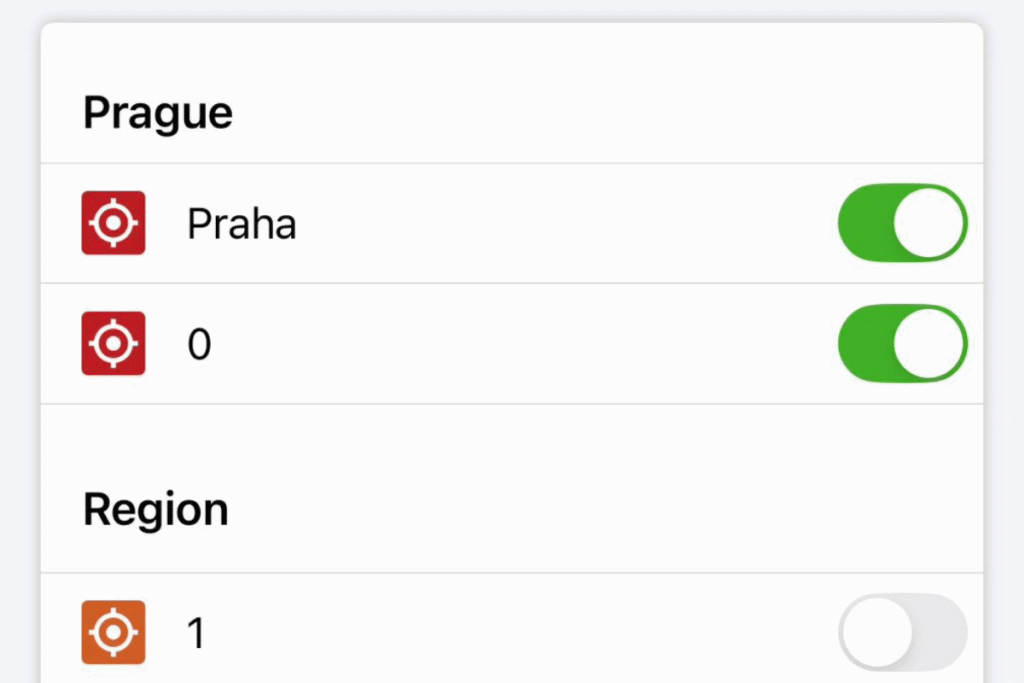
Here’s what you need to know:
- Praha/P+0 – This covers central Prague and is what 99% of visitors, students, and residents need. It includes all of Prague 1, Prague 2, Prague 3, etc. – basically the entire city.
- Additional numbered zones/regions (1-12) – These extend into suburbs around Prague. Unless you’re living far outside the city center or regularly commuting to outer areas, you won’t need these.
My recommendation: Stick with Praha/P+0 unless you have a specific reason to add additional zones. It covers all the areas you’ll realistically travel within the city. Note that if you do add other zones, the price of the pass will change.
Step 7: Enter Payment Information & Review The final step is to enter your payment details. Before completing your purchase, double-check that everything is correct:
- Pass period (monthly, quarterly, annual)
- Validity dates (start and end)
- Zones selected
VERY IMPORTANT: Like tickets, passes need to be activated before use – but unlike tickets, you only activate your pass once at the beginning of its validity period. Make sure your pass is active before boarding public transport to avoid fines from inspectors.

Common Mistakes When Using Prague Public Transport
I’ve seen the ticket inspectors in action – and trust me, you don’t want to be on the receiving end of one of their checks without the proper ticket. Here are the most common mistakes to avoid.
1. Forgetting to Validate Your Ticket
This is the #1 mistake and I cannot stress this enough. You can purchase a ticket and have it sitting in your app, but if you don’t activate it before boarding, it’s worthless. Inspectors don’t care that you paid for the ticket – if it’s not activated, you’re riding without valid fare.
Imagine this scenario: You buy your 90-minute ticket, hop on the tram, and forget to hit that activate button. An inspector boards, checks your ticket, sees it’s inactive, and suddenly you’re facing a fine that’s exponentially more expensive than the ticket itself.
My tip: Always activate your ticket before you board any tram, metro, or bus. Make it a habit – purchase, activate, then board.
2. Buying the Wrong Ticket Type
It’s easy to grab a 30-minute ticket when you actually need a 90-minute one, especially if you’re not familiar with Prague’s transit times. A 30-minute ticket works great for short hops (like 3-4 stops), but if you’re crossing the city or transferring between metro and tram, you’ll likely need the 90-minute option.
Pro tip: When in doubt, buy the 90-minute ticket. The price difference is minimal (46 CZK vs 36 CZK – about $0.50), and it gives you peace of mind for longer journeys and multiple transfers.
3. Assuming You Won’t Get Checked
“I’ll just risk it for one stop” is a dangerous mindset. Prague’s ticket inspectors remind me of Roz from Monsters Inc – they’re always watching. They’re thorough, work in plain clothes, and board when you least expect it. I’ve personally witnessed inspectors check the same route multiple times in a single day.
What happens if you’re caught without a valid ticket:
- Standard fine: 2,000 CZK (~$98)
- Reduced if paid within 15 calendar days: 1,500 CZK (~$73)
- Further reduced if paid on the spot: The fine can be reduced even more if you pay the inspector immediately
- No valid excuse: Even genuine mistakes (forgot to activate, phone died, etc.) won’t save you from the fine
Inspectors will issue a fine on the spot, and the fine is significantly more expensive than any ticket you could buy, so it’s simply not worth the risk. Read more about potential fines here.

Frequently Asked Questions
Are there discounts available?
Yes! Prague public transport offers discounted fares for:
- Seniors (60-65 years): 50% discount – must show valid ID
- Seniors (65+ years): Free transport – must show valid ID
- Children (under 15 years): Free transport – may need to show ID for proof of age
- Students (15-26 years): Discounted rates available with valid student ID
Note that you’ll need to be prepared to show proof of eligibility to inspectors if purchasing discounted tickets.
Do I need to speak Czech to use the app?
No! The PID Lítačka app is available in English (if your app is stuck in the Czech, try clicking the ‘More’ section in the menu bar then ‘Language’ to switch to English) and most of the interface is easy to navigate. That said, some sections (like certain pass purchase steps) are still in Czech. Don’t let this discourage you – I’ve walked you through the tricky parts with screenshots above, so you’ll know exactly what to click even when the language switches.
What if my phone dies?
This is a legitimate concern, and unfortunately, if your phone dies, you can’t access your digital ticket – which means you’re technically riding without valid fare. Here’s how to protect yourself:
- Keep your phone charged, especially if you’re planning a long day of sightseeing
- Consider bringing a portable charger
- If your battery is getting low and you still need to travel, buy a physical paper ticket from a ticket machine as backup
- Take a screenshot of your activated ticket and send to a friend that you’re traveling with (though this won’t satisfy all inspectors, it’s better than nothing)
How do I navigate Prague’s public transport once I have my ticket?
I recommend using Google Maps or Apple Maps for navigating the trams in prague, metro lines, and buses – both work seamlessly with Prague’s public transport system and will show you exactly which tram, metro, or bus to take, including real-time departure information. You can also use the PID Lítačka app for navigation, but I personally always stuck with Google Maps.
Final Thoughts
The PID Lítačka app makes using Prague’s public transport incredibly straightforward, especially if you’re staying in the city for an extended period. I personally used the app for both short-term tickets when I first visited Prague and then for my annual pass when I moved there for my Master’s program. Not having to keep track of paper tickets was a game-changer – my phone is always with me anyway, so having everything digital just made sense.
If you want to explore your other options for buying tickets or learn more about Prague’s public transport in depth, check out my Prague public transport guide here. You’ll also find links to my other Prague transport guides below.
More Prague Transport Guides
Prague’s public transport system is honestly one of the best ways to explore the city. It’s affordable, efficient, and connects you to every corner of Prague and beyond. Trust me, after a few trips, you’ll be navigating like a local.
Have any questions or is there anything I didn’t cover? Leave a comment below or send me a message – I’m happy to help!
Happy travels, and enjoy discovering Prague!